
 Facebook
 X
X LinkedIn
 Forward
AMT Learning Center
Frequently Asked Questions
Answers to common questions about your account, purchasing courses, transcripts, CE credit, refunds, and technical support.
My Account / Profile
How do I log into my account?▾
- Navigate to amtlearning.americanmedtech.org
- Select the "AMT Learning login" link in the upper-right corner of the screen.
- Enter your AMT email and password.
- Select the "Login" button.
What can I do from My Account?▾
- Enrolled Courses — courses not started or in progress
- Courses with incomplete required portions remain listed until their expiration date (e.g., exhausting all CE exam attempts)
- Courses still needing an evaluation or credit claim remain listed until completed
- Completed Courses — courses where all requirements are successfully finished
- Bookmarks — courses saved for future purchase
- Orders & Receipts — a record of all AMT Learning Center purchases
- Edit Profile
How do I edit my account?▾
- Hover over "My Learning Dashboard" and select "Edit Profile"
- On the "My Account" page, select the "Edit" tab to make updates or changes.
Forgotten Username / Password
How do I reset my password?▾
- Select "Forgot password?" on the login screen
- Enter your email and select "Send Login Information"
- Note: updating your password will change it for all AMT sites
- Questions or help with a password change: [email protected]
Purchase a Course
How do I purchase a course?▾
- Select "Purchasing Options" from the user menu, or enter terms into the search bar to find a course
- 3 Choices for Purchase
- Credit Card Purchases Only (No Access Codes) - CE Courses and Study Resources
(Students / Members / Non-Members) - Purchase Access Codes in Bulk
(Organization Staff and Faculty) - Have an Access Code? Redeem it here
(No Credit Card Purchases)
- Credit Card Purchases Only (No Access Codes) - CE Courses and Study Resources
- 3 Choices for Purchase
- Alternatively users purchasing by credit card can select by course type on the AMT Learning Center frontpage
- Select a course to open its overview page, then select "Register"
- Select "Add to cart"
- Add multiple courses by clicking back in your browser after adding a course to cart
- Once ready, select the cart icon in the top-right corner
- Review your order and select "Checkout"
- Enter payment information and select "Review order"
- Finalize checkout
- You will receive an enrollment email once the course is ready
How do I apply a discount coupon code?▾
- Enter the coupon code in your cart, then select "Apply"
- Discounts apply to all eligible products in the cart
- Codes are not case sensitive, but check for extra spaces before or after
How do I search for courses in my specialty?▾
- Use the "Refine by" options in the course catalog search
Is there different pricing for members?▾
- Members can view discounted pricing after logging in and are currently in good account standing
Course Information
Will a course save my progress if I step away and return later?▾
- Yes — course progress saves automatically
Will a quiz or evaluation save my progress?▾
- Quizzes and evaluations only save progress if you select "Save Progress"
How do I return to a course and resume it?▾
- Under "My Learning Dashboard," select "Enrolled Courses"
- Select the course name to open its overview
- Select "Take course," then "Resume course"
My course isn't showing under Completed Courses — why?▾
- Under "My Learning Dashboard," select "Enrolled Courses" and check the course status
- Completion requires finishing the course evaluation and claiming credit
- Reopen the course and complete any remaining tasks to move it to Completed Courses and AMTrax
How do I find my course expiration date?▾
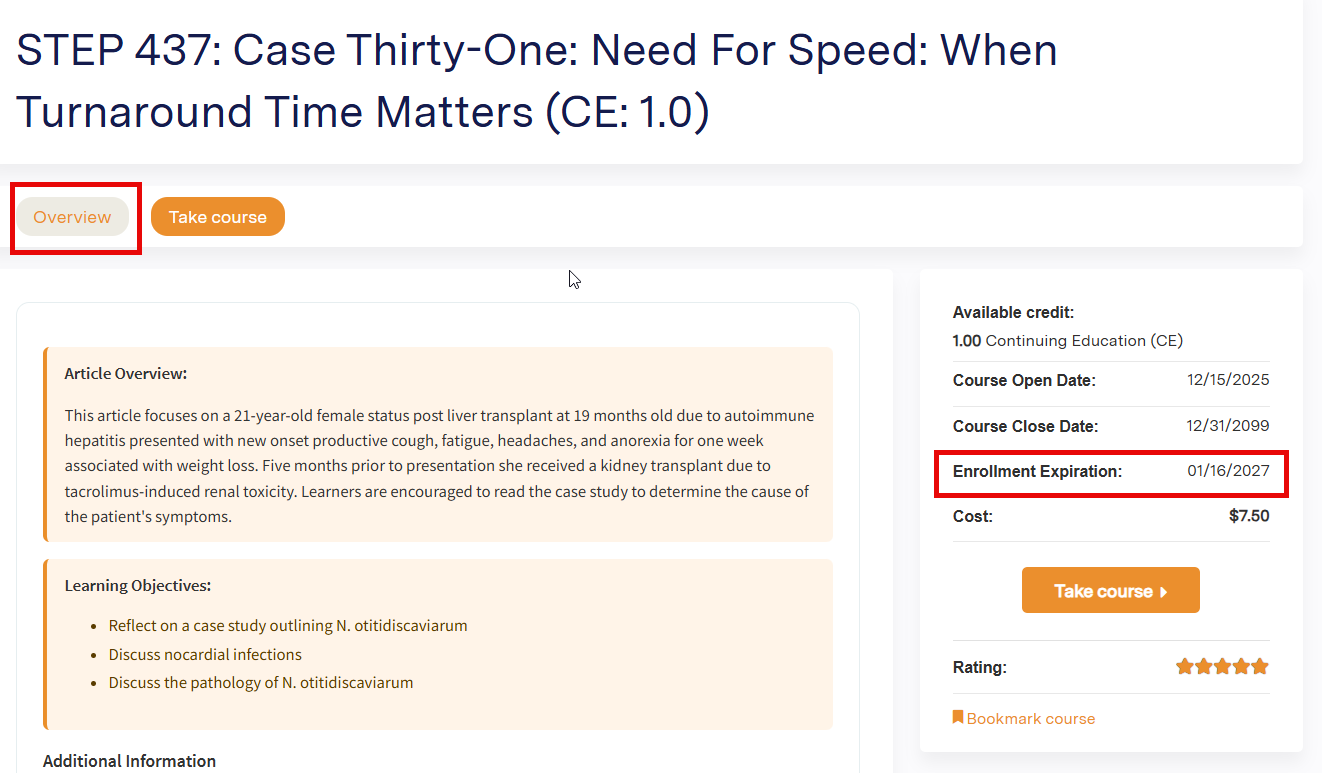
- Course expirations can be viewed by opening your course at My Learning Portal > Enrolled Courses
- Select the Course Name then select the Overview Tab
- The Enrollment Expiration date is located in the right-hand course information area, between Course End Date and Cost
What happens if my course expires?▾
- Courses must be completed within 180 days of the purchase date and time.
- If a course expires before all required activities have been completed, access to the course will end.
- A new purchase is required to regain access to an expired course.
- Important: Repurchasing a course will create a new enrollment and previous course progress may be lost.
- If you completed a Fundamentals Course but need additional time to study, a new purchase is also required and previous progress may not be retained.
- Please contact AMT Learning for assistance before repurchasing.
Can I review a course once completed?▾
- Yes. Access the course from “My Learning Dashboard” > “Completed Courses,” then select the course name to open it.
- Practice Exam content can be reviewed by launching the exam after the course is open.
Certificates / Transcripts / Credits
How do I view my transcript?▾
- Select the "My Learning Dashboard" tab, then select "Completed Courses"
How can I download a certificate?▾
- Under "My Learning Dashboard," select "Completed Courses"
- Select "Download" next to the course title you'd like a certificate for
How do I track AMT Learning Center earned credits? Or My credits are not showing in AMTrax?▾
- Credits earned through AMT Learning Center courses are automatically applied to your AMTrax transcript
- Courses must be listed in your completed courses. If course appears under enrolled please open the course and check that all activities are complete
- Evaluation and Credit Claim are required
- AMT Learning Center CE credit typically posts to AMTrax within 1–2 business days after posting to your completed courses, usually the next day between 8:00 AM–12:00 PM EST
- Do not self-report AMT Learning Center credit in AMTrax — this can create duplicate records
Technology Support
Which browser should I use?▾
- The AMT Learning Center works with most modern browsers, including Chrome, Firefox, Edge, and Safari (Mac)
Do I need Adobe Reader to take a course?▾
- A PDF reader, such as Adobe Acrobat Reader, is required for some courses
A course uses popup windows and isn't loading — what do I do?▾
- Check that your browser's popup blocker has been disabled for the site
Refund Policy
What does the AMT Learning Center refund policy cover?▾
This policy applies only to content purchased through the AMT Learning Center, including:
- CE Courses
- Study Resources
Refunds for applications and certification exams are handled separately — contact AMT Certification Experience.
Am I eligible for a refund?▾
- Refund requests must be submitted within 10 business days from the date of purchase.
- A course is not eligible for a refund if any portion of the course content has been accessed.
How do I request a refund?▾
- Submit your request using the AMT Learning Course Refund Request Form.
AMTrax & Self-Reporting
How do I track my non-AMT continuing education through AMTrax?▾
AMTrax is AMT's online CE tracking system. It provides a convenient way to document certification-related activity for employers and licensing agencies, and to self-assess your progress toward AMT's Certification Continuation Program (CCP) requirements.
- Credit earned through the AMT Learning Center posts to your AMTrax transcript automatically — do not self-report Learning Center courses to avoid duplicate records.
- Other qualifying CE activities (outside courses, presentations, publications, etc.) should be self-reported directly in AMTrax.